
News
HOME opens on your yards
HOME now opens on your yards, one round shape for each, bigger when more is going on. Swipe up for your feed, and the yards fold into a row of tiles at the top.
When you open CommonYard, HOME now starts with your yards, side by side on a plain page. The busier a yard is today, the bigger it is.
Your yards, one shape each
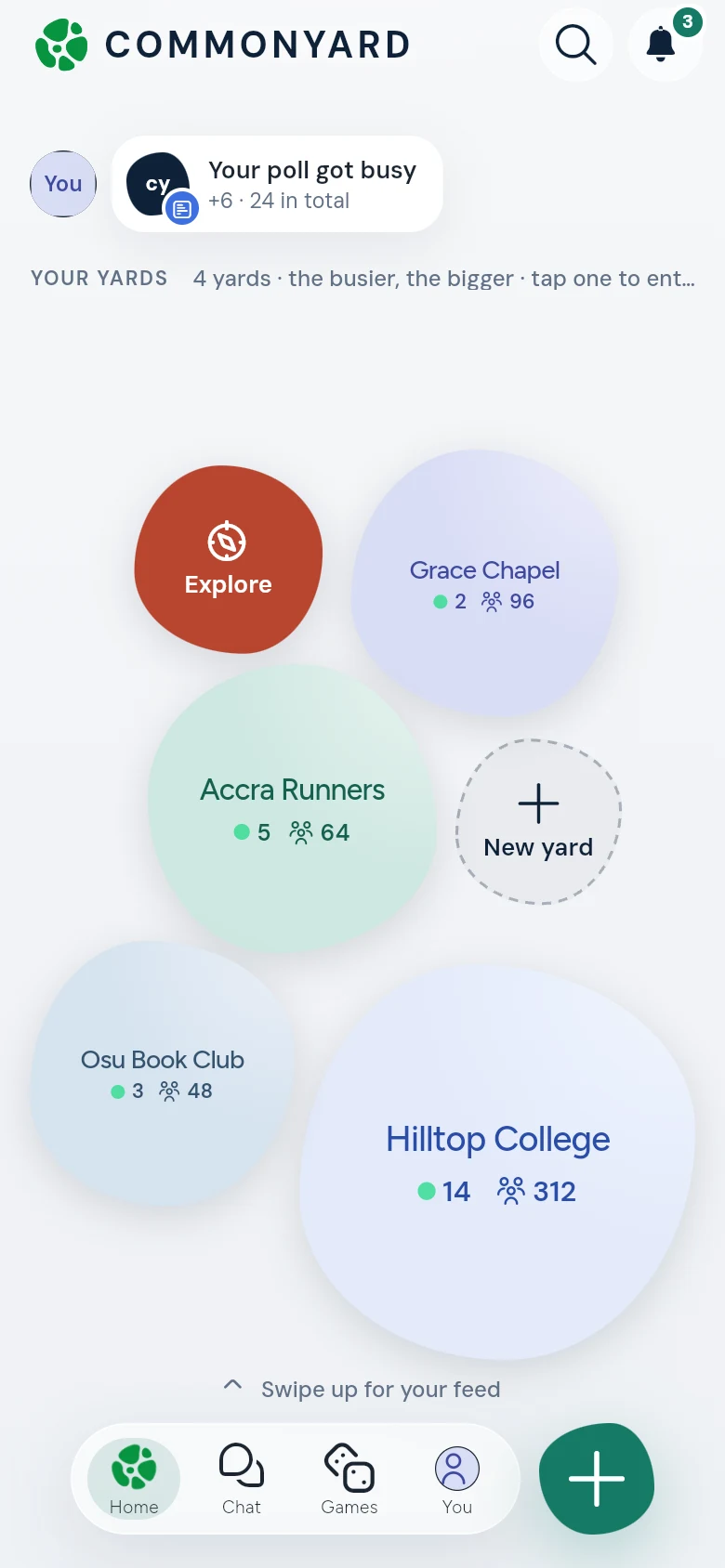
- Tap a yard to go into it. Its posts come up, newest first.
- Each yard shows its name, how many are here now (by the green dot) and how many members it has. A + and a number beside a yard is what your posts there gained.
- In more yards than fit? The last shape says + and a number. Tap it for all your yards.
- Explore is the way to find a yard to join, and Start a yard (or New yard, when it is small) the way to make one.
What happened to your things
Along the top, beside your picture, is a row of small cards, like Your poll got busy: new votes or replies on something of yours, a yard you joined this week. Tap one to go to it. When nothing has happened yet, it says Nothing new on your posts yet.
Swipe up for your feed
- Swipe up and the yards fold into a row of small tiles under the top bar. The posts come up under them.
- The first tile is CommonYard, the whole Yard. Tap a tile to change yard. You can also swipe sideways on the posts.
- Under the tiles, a line says which yard you are reading and what is on there. Tap the small arrow beside it to go Back to all your yards. A yard you run has its gear there too, for Manage yard.
- At the end of a yard’s posts, NEXT YARD takes you on to the next one.
- Your next move and Happening now are still there, at the top of the posts.