
Guide · Getting started
Get started on CommonYard
Open CommonYard in your browser, look around, and join when you want to take part. It's free and there's nothing to download.
CommonYard runs in your phone’s browser or on a computer at commonyard.app. There is nothing to download, and it is free.
Steps
- Go to commonyard.app in Chrome, Safari or any other browser.
- The first time, a short tour shows you around. Tap through it, or tap Skip.
- Look around. You can read the Yard before you have an account.
- When you want to take part — vote in a poll, sign a petition, join a yard — just tap. CommonYard asks you to join right then, and keeps what you tapped.
- Tap JOIN COMMONYARD and join with Google, Apple or your phone number. If you already have an account, tap I ALREADY HAVE AN ACCOUNT instead.
- You come straight back to where you were, and what you tapped is counted.

Finding your way around
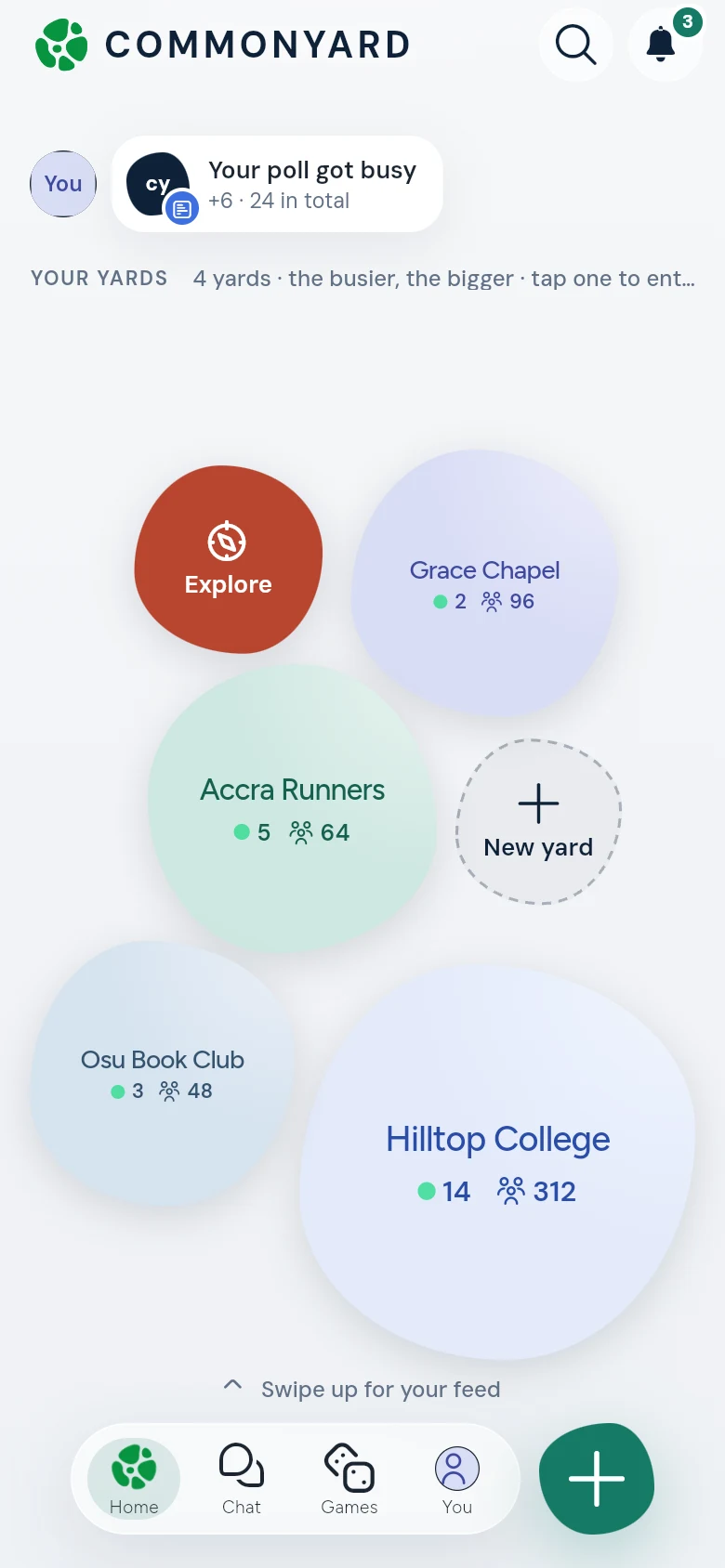
- At the top is the bar: the CommonYard logo, once you’ve joined, your streak (a flame and how many days), then Search and the bell. Tap the streak to open YOU. See Points, streaks and your figures.
- Once you have joined, HOME opens on your yards, one round shape for each, under YOUR YARDS. The busier a yard is today, the bigger it is. Each shows its name, how many are here now (by the green dot) and how many members it has. Tap a yard to go into it.
- Above them, beside your picture, small cards show what happened to your things, like Your poll got busy: new votes or replies, a yard you joined this week. Tap one to go to it.
- In more yards than fit? Tap the + and a number for a list of all your yards. Explore finds a yard to join, and Start a yard (or New yard, when it is small) makes one. See Find and join a yard.
- Swipe up for your feed. The yards fold into a row of small tiles under the top bar, and the posts come up under them. The first tile is CommonYard, the whole Yard. Tap a tile, or swipe sideways on the posts, to change yard. The small arrow beside the yard’s name takes you Back to all your yards.
- A yard you run — as its owner, an admin or a mod — has a small gear beside its name when you are reading it. Tap the gear for Manage yard. See Run your yard.
- At the top of the posts, Your next move is one thing to do now, picked for you; tap Something else for another. Happening now lists the games that are on or about to start, with Join, Remind me or Play.
- Then come the posts, newest first. When you vote, answer or take a side on one, the next thing to do moves up right under it, marked NEXT UP. At the end of a yard’s posts, NEXT YARD takes you to the next one.
- The bar at the bottom has HOME (the CommonYard logo), CHAT (the speech bubble, for your chats), GAMES (the game pad) and YOU (your picture). The round + beside it is for making something.
- Search (the magnifying glass) and your notifications (the bell) are at the top right. A number on the bell is how many are new.
- Tap the CommonYard logo at the top to jump back to the top of the page.
- Inside a yard, CHAT puts that yard’s chat at the top, and the bar adds PRACTICE in a school yard, or FAITH in a faith yard. See Chat in your yard.
Good to know
- On a new phone or computer, sign in the same way you joined: the same Google account, Apple ID or phone number.
- If you tap a choice and then close the join sheet with Not now — keep scrolling, nothing is counted until you join.
- A yard you’re in but can’t find? Tap the + and a number beside your yards on HOME for all of them, or search for its name.