
Guide · Taking part
React and reply
Give a post an emoji, reply in its thread, and use the three-dot menu to save, report or hide it.
React with an emoji
- Tap the smiling face at the bottom left of a post. A row of emoji opens.
- Tap an emoji. It lands on the post.
- To change it, open the row again and tap another. To take it back, tap the one you gave.

Reply
- Tap the speech bubble on the post — it shows how many replies there are. The post’s thread opens.
- Write your reply in Add a comment and send it. You can also send a voice note, a picture or a GIF.
- To answer one reply, tap REPLY under it.
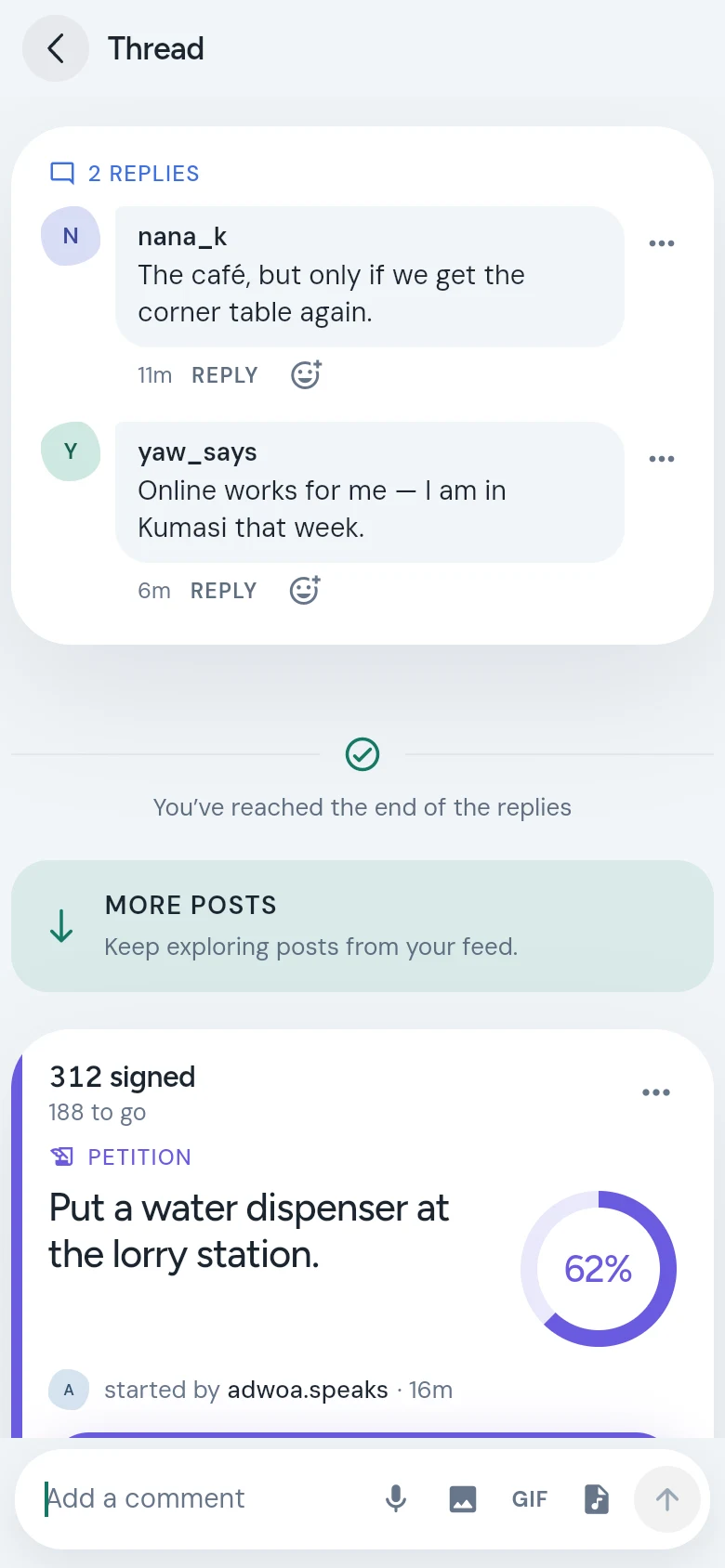
When someone replies to you, the notification opens right at their reply.
After the replies
Under the last reply, MORE POSTS carries on with the next posts from the Yard, so you can keep reading without going back.
The three-dot menu
Every post and reply has a menu behind its three dots (•••). On other people’s posts it holds Save, Report, Hide this post and Block user. On your own you’ll find Edit post, Take it down and Add to a series.
Posts you save are kept under Saved on your profile.
Good to know
- A reply earns 4 points and a reaction earns 1.
- Keep it kind. See the community guidelines.
- For reporting and blocking, see Stay safe on CommonYard.