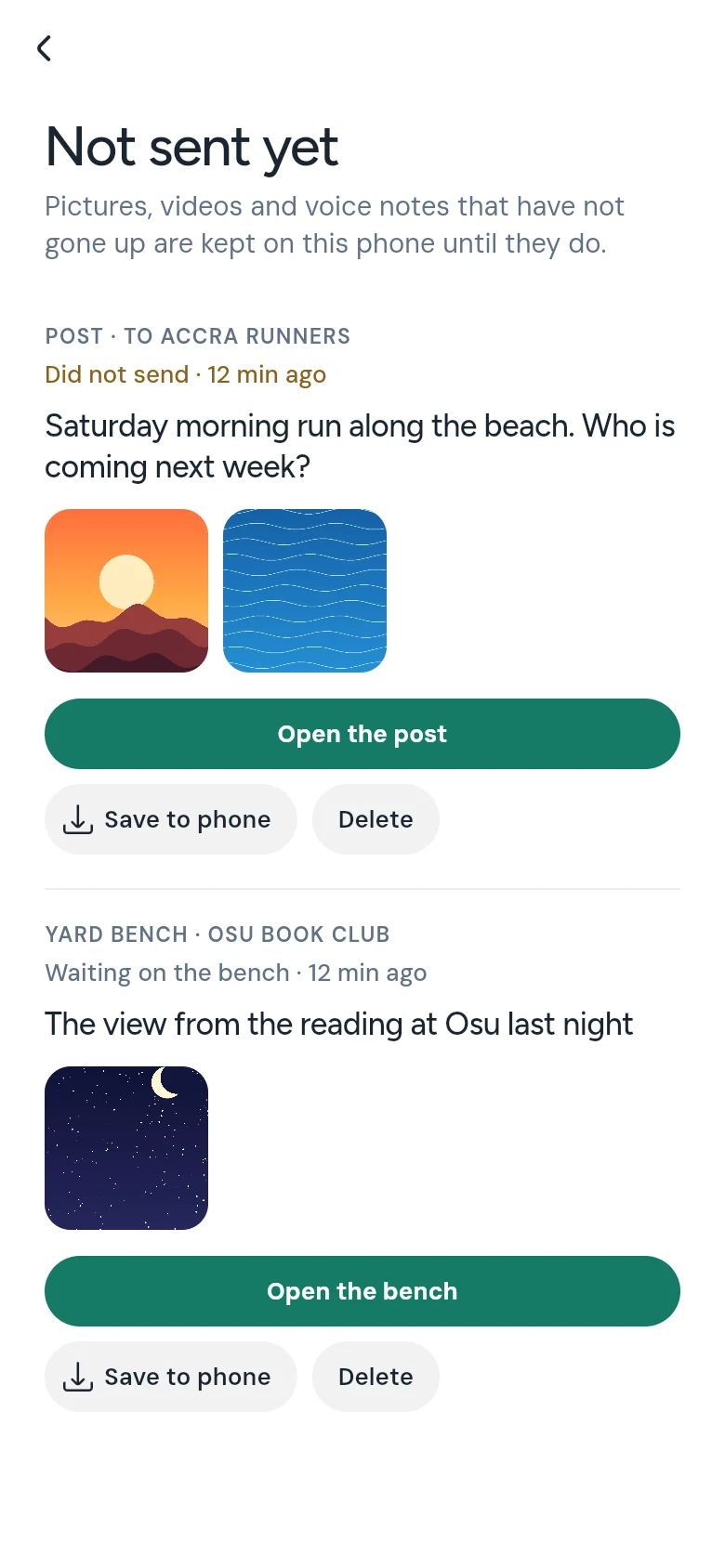
When a picture, a video or a post does not go up, CommonYard keeps it on your phone under Not sent yet. Open it again, save it to your phone, or delete it.
Updated
Sometimes a post or a message does not go up — the network drops, or you close the page too soon. CommonYard now keeps what you were sending on your phone, so you don’t lose it. It all waits on one page, Not sent yet.
Steps
Tap PROFILE on the bar, then the gear at the top right for Settings.
Tap Not sent yet. Beside it you see how many things are waiting, or Nothing waiting.
Find what you lost. Each one says what it was and where it was going, like POST · TO ACCRA RUNNERS or YARD BENCH, and how it stands: Did not send, May not have gone, In a draft or Waiting on the bench.
Tap Open the post or Open the bench to go back to where it was going, with your words and pictures still there, and send it again.
Everything that did not go up, kept on your phone.
Other ways to it
On What you made, a line at the top says how many things are kept on this phone, when there are any. Tap it.